STBEmu Codes 2027: Working Portal URLs, MAC Addresses and Android Setup Guide
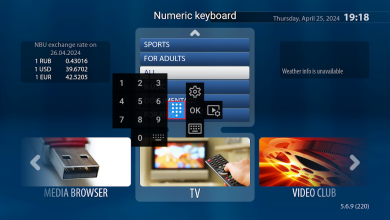
Are you searching for STBEmu Codes Free 2027, working portal URLs, or a reliable MAC address configuration? STBEmu is a popular application used to emulate compatible MAG-style IPTV set-top boxes. It allows users to connect to supported Stalker portals and organize IPTV services through a familiar television interface.
Searches for working STBEmu portal and MAC, free STBEmu portal codes, and daily updated STBEmu codes show that users want straightforward setup instructions and reliable connections. Others are looking for Android tutorials, Smart TV compatibility, and portal troubleshooting.
In this guide, we explain how STBEmu works, what portal URLs and MAC addresses do, how to configure the application, and how to avoid misleading websites advertising unlimited free access.
What Are STBEmu Codes Free 2027?
The keyword STBEmu Codes Free 2027 is commonly associated with portal addresses and device configuration details used by STBEmu.
A typical setup may require:
- A Stalker portal URL.
- A compatible device profile.
- A MAC address or device identifier.
- Authorization from an IPTV service provider.
These details help the application communicate with the provider’s server. The provider then checks whether the device is registered and whether the account is allowed to access the service.
It is important to understand that STBEmu is an application, not a source of television channels. There is no universal code that provides free access to every IPTV service.
Working STBEmu Portal and MAC: How Does It Work?
A search for working STBEmu portal and MAC usually refers to connecting the application to a compatible Stalker middleware server.
Two elements are especially important.
Portal URL: This is the server address supplied by the provider. It tells STBEmu where to connect.
MAC address: This is a device identifier that some MAG-style services use for registration and authentication.
The portal and MAC address must be configured according to the provider’s instructions. A random combination found online will not necessarily work.
Changing a MAC address does not create a subscription or authorize access to protected channels.
For reliable configuration, use the portal URL and device registration details assigned to your own account.
Free STBEmu Portal Codes and STBEmu MAC and Portal List
Many users search for free STBEmu portal codes or an STBEmu MAC and portal list to find ready-to-use configurations.
However, public lists can contain outdated, private, or unauthorized information. A portal may be online but still reject an unregistered device.
Before using any portal information, consider these points:
- Is the portal provided by a legitimate service?
- Is the device authorized to connect?
- Is the portal address current?
- Does the provider support STBEmu?
- Are the subscription terms clear?
A trustworthy provider should supply its own configuration instructions. Avoid websites that publish other customers’ MAC addresses or claim that every listed portal is guaranteed to work.
STBEmu Codes Unlimited 2027: Is Unlimited Access Possible?
The phrase STBEmu Codes Unlimited 2027 is often used in searches for unrestricted IPTV access.
However, unlimited access is not a feature that STBEmu can generate.
Service providers may apply restrictions involving:
- Subscription duration.
- Registered devices.
- Simultaneous connections.
- Available channel packages.
- Geographic availability.
- Account authentication.
Websites promising permanent access to every premium channel through free portal codes should be treated cautiously.
If you want to test a service, look for an official free trial with clearly explained terms.
Daily Updated STBEmu Codes and Working STBEmu Codes 2026 Free Daily Update
Searches for daily updated STBEmu codes and working STBEmu codes 2026 free daily update reflect interest in current portal information.
The term “daily updated” should not be accepted as proof that a portal is active. There is no universal public database that verifies every STBEmu portal each day.
Portal availability is managed by individual providers. Addresses, account permissions, and device registrations may change.
To check your connection:
- Review official provider announcements.
- Confirm that your account is active.
- Verify the portal URL supplied to you.
- Check the registered MAC address.
- Ask the provider about maintenance.
- Follow any updated configuration instructions.
This is more reliable than repeatedly trying random portal addresses.
STBEmu Stalker Portal Codes and Stalker Portal Codes STBEmu
The terms STBEmu Stalker portal codes and Stalker portal codes STBEmu refer to configuration details associated with Stalker-based IPTV systems.
Stalker middleware helps compatible IPTV platforms manage device communication, authentication, and service information.
Depending on the provider, a Stalker portal may support:
- Device registration.
- Channel categories.
- Programme guide information.
- Video-on-demand menus.
- Account authentication.
- Service availability information.
STBEmu can emulate aspects of compatible set-top-box environments. However, it cannot independently create valid portal credentials or bypass provider authorization.
Free Working STBEmu Codes Today: Avoid Fake Access Offers
The phrase free working STBEmu codes today attracts users looking for immediately usable portal and MAC combinations.
Be careful with websites that advertise:
- Guaranteed working portals.
- Free premium channels forever.
- Unlimited MAC address combinations.
- Private server access without registration.
- STBEmu Pro activation codes from unknown sources.
These offers may contain expired details, misleading links, or unsafe downloads.
A legitimate provider may offer a limited trial, but it should explain the trial period, supported devices, and service conditions.
Never share your existing account password or private device information with an unknown website.
STBEmu Portal URL List Working Server and STBEmu IPTV Server List Updated
Users searching for an STBEmu portal URL list working server or an STBEmu IPTV server list updated often want to find an active server quickly.
However, a server address alone is not enough to access a service. The provider may require a registered device and an active account.
A portal can fail because:
- The server is undergoing maintenance.
- The address has changed.
- The device is not registered.
- The subscription has expired.
- The network connection is unstable.
- The provider has restricted access.
For this reason, use the portal address supplied by your provider rather than relying on anonymous server lists.
STBEmu Codes 2027
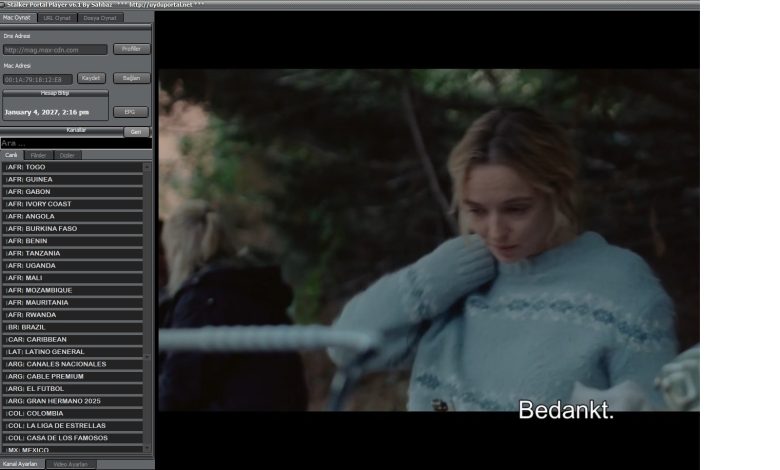
[+] Panel: http://mag.max-cdn.com/c/ [+] Mac: 00:1A:79:01:0E:A6 [+] Exp.: February 16, 2027, 11:41 am [+] ᴍᴀᴄ ꜱᴛᴀᴛᴜꜱ: ᴀᴄᴛɪᴠᴇ ᴍᴀᴄ😝 [+] ᴍ3ᴜ ꜱᴛᴀᴛᴜꜱ: ᴏꜰꜰʟɪɴᴇ😔 [+] ᴄʜᴀɴɴᴇʟCategories: 62 [+] ᴠᴏᴅCategories: 1 [+] ꜱᴇʀɪᴇꜱCategories: 2 [+] m3u_Url:

STBEmu MAC Address Working Today and MAC Address Generator
The keyword STBEmu MAC address working today is associated with users trying to configure or verify their device identifier.
Some websites also advertise an STBEmu MAC address generator working tool.
Users should be cautious. A MAC address generator cannot create legitimate subscription access or register a device without provider authorization.
A MAC address may be linked to a specific customer account. Using another person’s identifier can cause authentication problems and may violate service terms.
For a correct setup:
- Check the MAC address displayed in your STBEmu profile.
- Compare it with the device registered by your provider.
- Contact support if the information does not match.
- Do not copy MAC addresses from public lists.
STBEmu Setup Android Step by Step
The keyword STBEmu setup Android step by step is popular among users configuring the application on Android phones, tablets, and TV boxes.
Follow this general process:
- Download STBEmu from an official or trusted source.
- Open the application.
- Navigate to the profile or configuration settings.
- Create or select a profile.
- Enter the portal URL supplied by your provider.
- Check the device identifier and registration instructions.
- Save the configuration.
- Restart the application if required.
- Allow the application to connect to the authorized portal.
Menu names may vary between application versions.
For Android TV, check that the application supports your device and remote-control navigation.
STBEmu Smart TV Setup Guide
A STBEmu Smart TV setup guide can help users understand whether their television supports the application.
Compatibility depends on the television operating system and the application’s available distribution options.
Before installing STBEmu, check:
- Whether your Smart TV uses Android TV or Google TV.
- Whether the application supports your operating system.
- Whether your TV has enough available storage.
- Whether the portal configuration is supported.
- Whether remote-control navigation works correctly.
Some Smart TVs use operating systems that do not support Android applications. In those cases, a compatible external Android TV device may be required.
STBEmu Portal URL No Buffer: How to Improve Streaming
The search phrase STBEmu portal URL no buffer reflects a common goal: smooth playback without interruptions.
However, a portal URL cannot guarantee buffer-free streaming.
Playback quality depends on several factors:
- Internet speed and stability.
- Wi-Fi signal strength.
- Provider server performance.
- Device processing capability.
- Video bitrate and resolution.
- Network congestion.
To improve playback:
- Use a stable broadband connection.
- Connect through Ethernet when possible.
- Restart your router if the connection is unstable.
- Close unnecessary background applications.
- Keep the application and device software updated.
- Contact the provider if the service repeatedly becomes unavailable.
No provider or application can guarantee zero buffering under every network condition.
STBEmu Codes for Smart TV 2026 and Android Compatibility
Searches for STBEmu codes for Smart TV 2026 and STBEmu codes for Android show that users want one configuration that works across different devices.
However, portal compatibility depends on the provider, registered device profile, application version, and operating system.
Before changing devices, ask the provider whether your account supports the new device and whether registration needs to be updated.
Best STBEmu Codes 2027: Choosing a Reliable Setup
Instead of searching only for the best STBEmu codes 2027, evaluate the complete service.
A reliable setup should include:
- Authorized content distribution.
- Clear portal configuration instructions.
- Proper device registration.
- Transparent subscription conditions.
- Compatible software.
- Responsive technical support.
- Clear privacy and security practices.
These factors are more useful than promises of free unlimited access.
Frequently Asked Questions
Are free STBEmu portal codes available in 2027?
Some providers may offer official free trials, but there is no universal list of guaranteed working free portals.
Where can I find an STBEmu portal URL?
Obtain the portal URL directly from your authorized service provider.
Can an STBEmu MAC address generator provide free access?
No. Generating an identifier does not create an account or grant permission to access a protected service.
Does STBEmu work on Android?
STBEmu supports compatible Android devices. Check the current application requirements before installing it.
Can I use STBEmu on a Smart TV?
It depends on the television’s operating system and application compatibility. Android TV and Google TV devices may offer more options than other Smart TV platforms.
Why does my STBEmu portal stop working?
Possible reasons include server maintenance, an expired subscription, incorrect settings, or a device registration issue.
Conclusion
Searching for STBEmu Codes Free 2027, working STBEmu portal and MAC, or daily updated STBEmu codes is often the first step toward understanding IPTV configuration.
A successful setup requires more than a portal URL. Users need compatible software, correct device settings, a registered MAC address where required, and authorization from a legitimate provider.
Whether you are configuring STBEmu on Android, setting up a Smart TV, or troubleshooting a Stalker portal, use trusted software and official provider instructions.
For more STBEmu tutorials, Android setup guides, portal configuration information, and IPTV technology articles, explore the latest resources on our website.